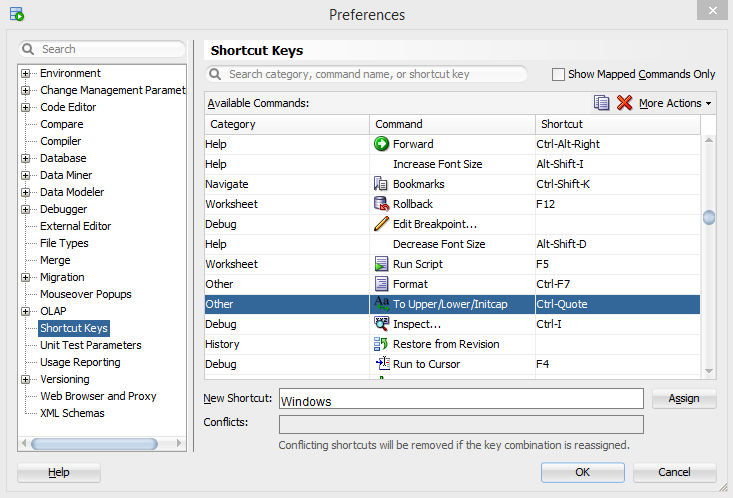
Problem: I need a shortcut to convert text or script in lowercase and uppercase in Oracle SQL Developer.
Solution:
Go to SQL Developer -> Tools -> Preferences -> Shortcut Keys
On the above path, you will find your shortcut commands or you can define for converting text to uppercase or lowercase. Please see the screenshot below for the reference.
Problem: When I build my maven project, I have one XML file in my project that starts validation but it remains under the validation process. So I want to exclude it from validation.
Solution:
Go to Eclipse/STS -> Window -> Preference -> Validation
Click on the red marked button to go to a particular setting. The below window will pop up.
Click on "Exclude Group" and then click "Add Rule..."
After click on "Add Rule..." below the window of "New Filter Rule Wizard" will pop up.
Select "Folder or file name" from the below options and then click on the Next button.
After Click on Next below window will be shown. Browse folder or file you want to exclude and click Finish.
Apply the above changes. I hope this information will be helpful.
Problem: Previously my OnePlus Smartphone was connecting to my Dell laptop using Mobile HotSpot. But after some time when I updated my mobile OS updates. My Hotspot was not displaying under the wireless network connections list.

Solution: I found that under Wi-Fi hotspot setting there was one property named AP Band, it has two options 2.4 GHz Band and 5.0 GHz Band. I was not able to connect over 5.0 GHz. so I changed it to 2.4 GHz and applied the changes. It started showing again in the wireless network connections list and I was able to connect it.
Hope it will help.
Problem: I am writing Java code in Eclipse IDE but the suggestion pop up window for java methods is not showing. Which generally pops up on the click of ctrl+space.

Solution:
Follow the below steps:
Step 1: Go to Windows -> Preferences -> Java -> Editor -> Content Assist -> Advanced -> select Java Proposals Checbox.
Step 2: Click Apply -> OK
Step 3: If still not working then restart Eclipse IDE.
(check screenshot for reference)
 Problem: During Selenium Automation testing, I tried to run my code script on the Mozilla Firefox browser and my code was not able to find the path of installed software/browser.
Solution:
I used the below code snippet to set the path.
System.setProperty("webdriver.firefox.bin", "C:\\Program Files\\Mozilla Firefox\\firefox.exe");
 Problem: When we get a message that port 8080 already in use then it becomes very difficult to use the same port for different processes.
Solution: Just run the below commands in command prompt and whoop! magic happens.
Follow the screenshot for the reference.
Sample commands:
netstat -ano | findstr :8080 (replace 8080 with your port)
taskkill /F /PID 11237 (replace 11237 with your pid)
A sample screenshot is for port 8088
 Problem: Some times we have to execute insert queries of a table that we exported in .sql file. For multiple .sql files having huge data, it's not easy to execute those queries using copy and paste in SQL Developer tools.
Solution: To execute .sql file you just need to write the path of your .sql file after @ and then file name with extension with delimiter ';' in the end. Select the complete command and press yellow highlighted green triangular button to execute sql script command. Just follow the below image for the reference.
Sample command:
@F:\myData.sql
$ grep "somestring" filename.log
grep 'word' filename
grep 'word' file1 file2 file3
grep 'string1 string2' filename
cat otherfile | grep 'something'
command | grep 'something'
grep --color 'data' fileName
Problem: All methods of FormData do not work/compatible with Internet Explorer. The only method that is successful is 'append'. but suppose you want to override values of specific keys but in that scenarios 'set' and 'delete' methods will not work on Internet Explorer.
Solution: You may use below code that will work on IE.
var form = $('form')[0];
var formData = new FormData();
var inputs = form.getElementsByTagName('input'); //for input box
var inputsList = Array.prototype.slice.call(inputs);
inputsList.forEach(
function (i) {
if (i.name !== 'excludedName') {
formData.append(i.name, i.value);
}
}
);
formData.append('excludedName', 'value you want to set');
Note: for 'select' and 'textarea' use:
var selects = form.getElementsByTagName('select');
var textareas = form.getElementsByTagName('textarea');
 When I was working with hibernate project. I got this exception. Actually, the issue was because of missing @Id from one of my entity class. @Id is used on the primary key field in the entity class. The field is a primary key in your database table.
If you do not have any primary key in your database table then you can use rowId as the primary key for your entity class.
@Id
@Column(name = "ROWID", insertable = false, updatable = false)
private String rowId;
Problem : I compiled below code and got possible loss of precision error.
int a = Math.pow(3, 5);
System.out.println(a);
Solution : According to the java documentation, Math.pow() expects two doubles, and returns a double. When you pass two int values to this method, it converts an int to double. But when we assign the value to an int, it gives, possible loss of precision error while compiling the code. So you can cast method to an int or assign the returning value to double to resolve the error.
int a = (int)Math.pow (3,5);
or
double a = Math.pow (3,5);
Problem : I want to set JSP Editor as a default editor in Eclipse IDE.
Solution : Follow below steps to change default editor to open JSP files in Eclipse IDE.
Step 1 : Start Eclipse IDE, click on Window then Preferences.
Step 2: In the pop-up window, click on "File Associations" inside "Editors" then click on *.jsp in "File types".
Step 3: After that you can see "Associated editors" as shown in below screenshot. Just select JSP Editor and click on Default button and OK button.
Problem : Getting following error when starting eclipse IDE.
 org.osgi.framework.BundleException: Unable to acquire the state change lock for the module: osgi.identity; osgi.identity="org.eclipse.core.runtime"; type="osgi.bundle"; version:Version="3.10.0.v20140318-2214"; singleton:="true" [id=83] STARTED [STARTED]
at org.eclipse.osgi.container.Module.lockStateChange(Module.java:329)
at org.eclipse.osgi.container.Module.start(Module.java:389)
at org.eclipse.osgi.container.ModuleContainer$ContainerStartLevel.incStartLevel(ModuleContainer.java:1582)
at org.eclipse.osgi.container.ModuleContainer$ContainerStartLevel.incStartLevel(ModuleContainer.java:1562)
at org.eclipse.osgi.container.ModuleContainer$ContainerStartLevel.doContainerStartLevel(ModuleContainer.java:1533)
at org.eclipse.osgi.container.ModuleContainer$ContainerStartLevel.dispatchEvent(ModuleContainer.java:1476)
at org.eclipse.osgi.container.ModuleContainer$ContainerStartLevel.dispatchEvent(ModuleContainer.java:1)
at org.eclipse.osgi.framework.eventmgr.EventManager.dispatchEvent(EventManager.java:230)
at org.eclipse.osgi.framework.eventmgr.EventManager$EventThread.run(EventManager.java:340)
org.osgi.framework.BundleException: Unable to acquire the state change lock for the module: osgi.identity; osgi.identity="org.eclipse.core.runtime"; type="osgi.bundle"; version:Version="3.10.0.v20140318-2214"; singleton:="true" [id=83] STARTED [STARTED]
at org.eclipse.osgi.container.Module.lockStateChange(Module.java:329)
at org.eclipse.osgi.container.Module.start(Module.java:389)
at org.eclipse.osgi.container.ModuleContainer$ContainerStartLevel.incStartLevel(ModuleContainer.java:1582)
at org.eclipse.osgi.container.ModuleContainer$ContainerStartLevel.incStartLevel(ModuleContainer.java:1562)
at org.eclipse.osgi.container.ModuleContainer$ContainerStartLevel.doContainerStartLevel(ModuleContainer.java:1533)
at org.eclipse.osgi.container.ModuleContainer$ContainerStartLevel.dispatchEvent(ModuleContainer.java:1476)
at org.eclipse.osgi.container.ModuleContainer$ContainerStartLevel.dispatchEvent(ModuleContainer.java:1)
at org.eclipse.osgi.framework.eventmgr.EventManager.dispatchEvent(EventManager.java:230)
at org.eclipse.osgi.framework.eventmgr.EventManager$EventThread.run(EventManager.java:340)
Solution : Go to your eclipse IDE directory. Delete the lock files whose names starting with .fileTable from following location:
configuration/org.eclipse.osgi/.manager
Now restart the eclipse without rebooting the system.
Problem : I was starting eclipse and it said an error has occurred, see ...\workspace\.metadata\.log.
 I opened the log file which had following error log.
Caused by: org.osgi.framework.BundleException: Exception in org.eclipse.core.resources.ResourcesPlugin.start() of bundle org.eclipse.core.resources.
at org.eclipse.osgi.internal.framework.BundleContextImpl.startActivator(BundleContextImpl.java:792)
at org.eclipse.osgi.internal.framework.BundleContextImpl.start(BundleContextImpl.java:721)
at org.eclipse.osgi.internal.framework.EquinoxBundle.startWorker0(EquinoxBundle.java:936)
at org.eclipse.osgi.internal.framework.EquinoxBundle$EquinoxModule.startWorker(EquinoxBundle.java:319)
at org.eclipse.osgi.container.Module.doStart(Module.java:571)
at org.eclipse.osgi.container.Module.start(Module.java:439)
at org.eclipse.osgi.framework.util.SecureAction.start(SecureAction.java:454)
at org.eclipse.osgi.internal.hooks.EclipseLazyStarter.postFindLocalClass(EclipseLazyStarter.java:107)
Solution : Delete the snap file from this location .metadata/.plugins/org.eclipse.core.resources/.snap in your eclipse workspace.
Problem : I have installed Oracle 10g XE on Windows 8. When I try to start using the "Start Database" button, the command window pops up with the error :
C:\oraclexe\app\oracle\product\10.2.0\server\BIN>net start OracleXETNSListener
System error 5 has occurred.
Access is denied.
Solution : Right click on Start Database icon and Run as Administrator.
 Problem : I am working with Bootstrap Modal to display pop up window but whenever i click outside the modal or press escape button it goes disappear but i want to manually close it by clicking close button on modal pop up.
Solution : To disable on click set backdrop option as static and to prevent closing of the modal by esc button set keyboard option as false as shown in below given code.
1. If you are using javascript for displaying Modal.
$('#myModal').modal({backdrop: 'static', keyboard: false})
2. If you are using data attributes on html or jsp.
<button data-backdrop="static" data-keyboard="false" data-target="#myModal"
data-toggle="modal">
Click Here for Modal
</button>`
If you know that your internet is working fine and still you are facing this error on visiting website's URL. Then below given solution can solve your problem.
Problem :
Server not found
Firefox can't find the server at www.blogger.com.
- Check the address for typing errors such as ww.example.com instead of www.example.com
- If you are unable to load any pages, check your computer's network connection.
- If your computer or network is protected by a firewall or proxy, make sure that Firefox is permitted to access the Web.
Solution :
Step 1: Open Command prompt : Press Window Key + R, type cmd then click on OK button.
Step 2 : Type ipconfig /flushdns and press Enter. A message will appear stating Windows IP configuration Successfully flushed the DNS Resolver Cache.
Step 3 : Type exit on command prompt to close command prompt.
JavaScript :
We can disable or enable an input box by setting property true or false respectively by using below code.
Code of input box
Name: <input type="text" id="myName">
To Disable input box.
document.getElementById("myName").disabled = true;
To Enable input box.
document.getElementById("myName").disabled = false;
jQuery :
If you are using jQuery 1.6+ then you should use the .prop() function to disable or enable input field.
$("input").prop('disabled', true);
$("input").prop('disabled', false);
Above code will disable all the input fields, if you want to disable or enable particular field, then you should use class or id of that particular input field.
Name: <input type="text" id="myName" class="myName">
$("#myName").prop('disabled', true); // using id of input box
$(".myName").prop('disabled', false); // using class of input box
If you are using jQuery 1.5 or below then you should use the .attr() function.
To disable input field:
$("input").attr('disabled', 'disabled');
To enable input field:
$("input").removeAttr('disabled');
There is also .removeProp like .removeAttr in jQuery 1.6 but we should not use it because once you use removeProp you can not again disable it.
This is a procedure which has one out parameter of SYS_REFCURSOR type.
PROCEDURE p_get_data(query_result OUT SYS_REFCURSOR);
In java for working out with this procedure you need to import ojdbc14.jar and need to set registerOutParameter type as OracleTypes.CURSOR
import oracle.jdbc.driver.OracleTypes;

CallableStatement callStmt = connection.prepareCall("{call p_get_data(?)}");
callStmt.registerOutParameter(1, OracleTypes.CURSOR);
callStmt.execute();
ResultSet resultSet = (ResultSet) callStmt.getObject(1);
if(resultSet.next()) {
//Your Code here
}
SQL Developer date and time column returns only date so if you want to see both date and time on SQL developer then you have to make just a small change in SQL Developer's Preferences.
Go to Tools >> Preferences
Preferences >> Database >> NLS
set the Date Format as DD-MON-RR HH24:MI:SS
Disclaimer
We shall not be liable for the improper or incomplete transmission of the information contained in this communication nor for any delay in its response or damage to your system. We do not guarantee that the integrity or security of this communication has been maintained or that this communication is free of viruses, interceptions or interferences. Anyone communicating with us by email accepts the risks involved and their consequences. We accept no liability for any damage caused by any virus transmitted by this site.